

Abstract: This article mainly tests the GPU Core & Memory isolation functionality of the open-source vGPU solution HAMi.
Source: “Open Source vGPU Solution HAMi: Core & Memory Isolation Test”. Thanks to “Exploring Cloud Native” for their continued attention and contributions to HAMi.
1. Environment Setup
Here’s a brief overview of the test environment:
- GPU: A40 * 2
- K8s: v1.23.17
- HAMi: v2.3.13
GPU Environment
Using GPU-Operator to install GPU drivers, Container Runtime, etc. Reference -> GPU Environment Setup Guide: Using GPU Operator to Accelerate Kubernetes GPU Environment Setup
Then install HAMi, reference -> Open Source vGPU Solution: HAMi, Implementing Fine-grained GPU Partitioning
Test Environment
Simply use the torch image to start a Pod as the test environment
docker pull pytorch/pytorch:2.4.1-cuda11.8-cudnn9-runtimeTest Script
We can use PyTorch’s provided Examples as test scripts
https://github.com/pytorch/examples/tree/main/imagenetThis is a training demo that will print the time for each step. The lower the computing power given, the longer each step will take.
Usage is simple:
First clone the project
git clone https://github.com/pytorch/examples.gitThen start the service to simulate GPU consumption tasks
cd /mnt/imagenet/
python main.py -a resnet18 --dummy
Configuration
Need to inject environment variable GPU_CORE_UTILIZATION_POLICY=force into the Pod. The default limitation policy won’t restrict computing power when only one Pod is using that GPU.
Complete YAML
Mount the examples project into the Pod using hostPath for testing, and configure the command as the startup command.
Test by configuring vGPU to be limited to 30% or 60% respectively.
Complete YAML as follows:
apiVersion: v1
kind: Pod
metadata:
  name: hami-30
  namespace: default
spec:
  containers:
  - name: simple-container
    image: pytorch/pytorch:2.4.1-cuda11.8-cudnn9-runtime
    command: ["python", "/mnt/imagenet/main.py", "-a", "resnet18", "--dummy"]
    resources:
      requests:
        cpu: "4"
        memory: "32Gi"
        nvidia.com/gpu: "1"
        nvidia.com/gpucores: "30"
        nvidia.com/gpumem: "20000"
      limits:
        cpu: "4"
        memory: "32Gi"
        nvidia.com/gpu: "1" # 1 GPU
        nvidia.com/gpucores: "30" # Request 30% computing power
        nvidia.com/gpumem: "20000" # Request 20G memory (unit is MB)
    env:
    - name: GPU_CORE_UTILIZATION_POLICY
      value: "force" # Set environment variable GPU_CORE_UTILIZATION_POLICY to force
    volumeMounts:
    - name: imagenet-volume
      mountPath: /mnt/imagenet # Mount point in container
    - name: shm-volume
      mountPath: /dev/shm # Mount shared memory to container's /dev/shm
  restartPolicy: Never
  volumes:
  - name: imagenet-volume
    hostPath:
      path: /root/lixd/hami/examples/imagenet # Host directory path
      type: Directory
  - name: shm-volume
    emptyDir:
      medium: Memory # Use memory as emptyDir
2. Core Isolation Test
30% Computing Power
Setting gpucores to 30% shows the following effect:
[HAMI-core Msg(15:140523803275776:libvgpu.c:836)]: Initializing.....
[HAMI-core Warn(15:140523803275776:utils.c:183)]: get default cuda from (null)
[HAMI-core Msg(15:140523803275776:libvgpu.c:855)]: Initialized
/mnt/imagenet/main.py:110: UserWarning: nccl backend >=2.5 requires GPU count>1, see https://github.com/NVIDIA/nccl/issues/103 perhaps use 'gloo'
  warnings.warn("nccl backend >=2.5 requires GPU count>1, see https://github.com/NVIDIA/nccl/issues/103 perhaps use 'gloo'")
=> creating model 'resnet18'
=> Dummy data is used!
Epoch: [0][   1/5005]        Time  4.338 ( 4.338)        Data  1.979 ( 1.979)        Loss 7.0032e+00 (7.0032e+00)        Acc@1   0.00 (  0.00)        Acc@5   0.00 (  0.00)
Epoch: [0][  11/5005]        Time  0.605 ( 0.806)        Data  0.000 ( 0.187)        Loss 7.1570e+00 (7.0590e+00)        Acc@1   0.00 (  0.04)        Acc@5   0.39 (  0.39)
Epoch: [0][  21/5005]        Time  0.605 ( 0.706)        Data  0.000 ( 0.098)        Loss 7.1953e+00 (7.1103e+00)        Acc@1   0.00 (  0.06)        Acc@5   0.39 (  0.56)
Epoch: [0][  31/5005]        Time  0.605 ( 0.671)        Data  0.000 ( 0.067)        Loss 7.2163e+00 (7.1379e+00)        Acc@1   0.00 (  0.04)        Acc@5   1.56 (  0.55)
Epoch: [0][  41/5005]        Time  0.608 ( 0.656)        Data  0.000 ( 0.051)        Loss 7.2501e+00 (7.1549e+00)        Acc@1   0.39 (  0.07)        Acc@5   0.39 (  0.60)
Epoch: [0][  51/5005]        Time  0.611 ( 0.645)        Data  0.000 ( 0.041)        Loss 7.1290e+00 (7.1499e+00)        Acc@1   0.00 (  0.09)        Acc@5   0.39 (  0.60)
Epoch: [0][  61/5005]        Time  0.613 ( 0.639)        Data  0.000 ( 0.035)        Loss 6.9827e+00 (7.1310e+00)        Acc@1   0.00 (  0.12)        Acc@5   0.39 (  0.60)
Epoch: [0][  71/5005]        Time  0.610 ( 0.635)        Data  0.000 ( 0.030)        Loss 6.9808e+00 (7.1126e+00)        Acc@1   0.00 (  0.11)        Acc@5   0.39 (  0.61)
Epoch: [0][  81/5005]        Time  0.617 ( 0.630)        Data  0.000 ( 0.027)        Loss 6.9540e+00 (7.0947e+00)        Acc@1   0.00 (  0.11)        Acc@5   0.78 (  0.64)
Epoch: [0][  91/5005]        Time  0.608 ( 0.628)        Data  0.000 ( 0.024)        Loss 6.9248e+00 (7.0799e+00)        Acc@1   1.17 (  0.12)        Acc@5   1.17 (  0.64)
Epoch: [0][ 101/5005]        Time  0.616 ( 0.626)        Data  0.000 ( 0.022)        Loss 6.9546e+00 (7.0664e+00)        Acc@1   0.00 (  0.11)        Acc@5   0.39 (  0.61)
Epoch: [0][ 111/5005]        Time  0.610 ( 0.625)        Data  0.000 ( 0.020)        Loss 6.9371e+00 (7.0565e+00)        Acc@1   0.00 (  0.11)        Acc@5   0.39 (  0.61)
Epoch: [0][ 121/5005]        Time  0.608 ( 0.621)        Data  0.000 ( 0.018)        Loss 6.9403e+00 (7.0473e+00)        Acc@1   0.00 (  0.11)        Acc@5   0.78 (  0.60)
Epoch: [0][ 131/5005]        Time  0.611 ( 0.620)        Data  0.000 ( 0.017)        Loss 6.9016e+00 (7.0384e+00)        Acc@1   0.00 (  0.10)        Acc@5   0.00 (  0.59)
Epoch: [0][ 141/5005]        Time  0.487 ( 0.619)        Data  0.000 ( 0.016)        Loss 6.9410e+00 (7.0310e+00)        Acc@1   0.00 (  0.10)        Acc@5   0.39 (  0.58)
Epoch: [0][ 151/5005]        Time  0.608 ( 0.617)        Data  0.000 ( 0.015)        Loss 6.9647e+00 (7.0251e+00)        Acc@1   0.00 (  0.10)        Acc@5   0.00 (  0.56)
Each step takes about 0.6 seconds.
GPU utilization:
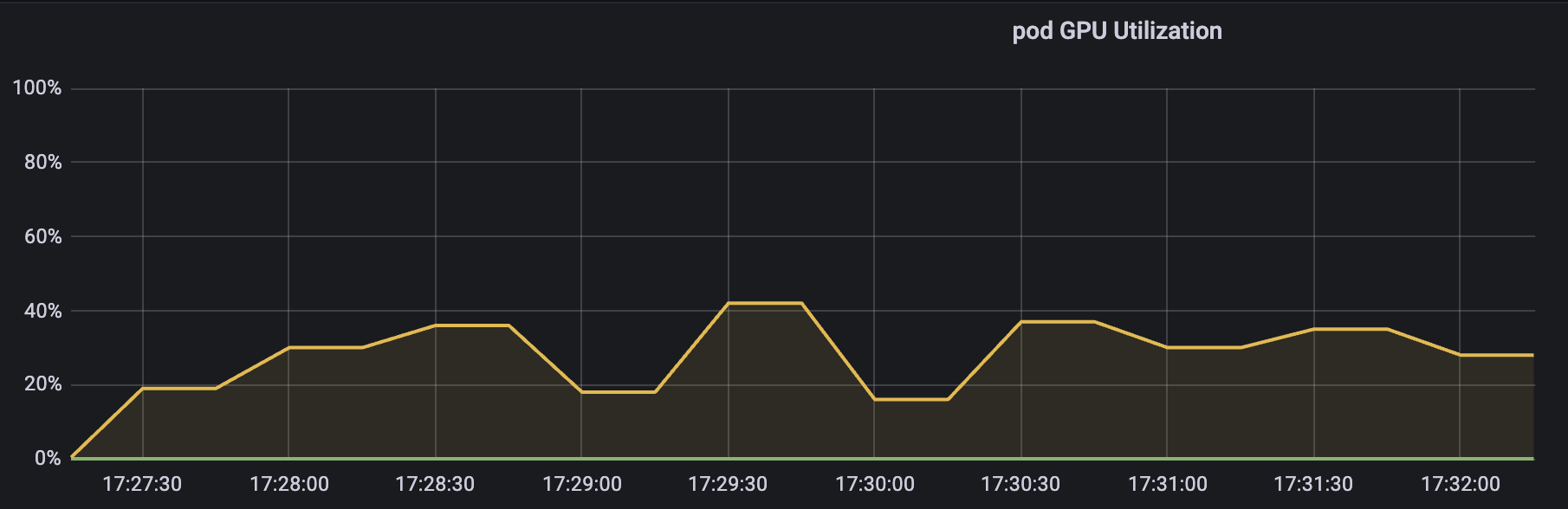
As we can see, the utilization fluctuates around our target value of 30%, averaging around 30% over a period of time.
60% Computing Power
Effect with 60%:
root@hami:~/lixd/hami# kubectl logs -f hami-60
[HAMI-core Msg(1:140477390922240:libvgpu.c:836)]: Initializing.....
[HAMI-core Warn(1:140477390922240:utils.c:183)]: get default cuda from (null)
[HAMI-core Msg(1:140477390922240:libvgpu.c:855)]: Initialized
/mnt/imagenet/main.py:110: UserWarning: nccl backend >=2.5 requires GPU count>1, see https://github.com/NVIDIA/nccl/issues/103 perhaps use 'gloo'
  warnings.warn("nccl backend >=2.5 requires GPU count>1, see https://github.com/NVIDIA/nccl/issues/103 perhaps use 'gloo'")
=> creating model 'resnet18'
=> Dummy data is used!
Epoch: [0][   1/5005]        Time  4.752 ( 4.752)        Data  2.255 ( 2.255)        Loss 7.0527e+00 (7.0527e+00)        Acc@1   0.00 (  0.00)        Acc@5   0.39 (  0.39)
Epoch: [0][  11/5005]        Time  0.227 ( 0.597)        Data  0.000 ( 0.206)        Loss 7.0772e+00 (7.0501e+00)        Acc@1   0.00 (  0.25)        Acc@5   1.17 (  0.78)
Epoch: [0][  21/5005]        Time  0.234 ( 0.413)        Data  0.000 ( 0.129)        Loss 7.0813e+00 (7.1149e+00)        Acc@1   0.00 (  0.20)        Acc@5   0.39 (  0.73)
Epoch: [0][  31/5005]        Time  0.401 ( 0.360)        Data  0.325 ( 0.125)        Loss 7.2436e+00 (7.1553e+00)        Acc@1   0.00 (  0.14)        Acc@5   0.78 (  0.67)
Epoch: [0][  41/5005]        Time  0.190 ( 0.336)        Data  0.033 ( 0.119)        Loss 7.0519e+00 (7.1684e+00)        Acc@1   0.00 (  0.10)        Acc@5   0.00 (  0.62)
Epoch: [0][  51/5005]        Time  0.627 ( 0.327)        Data  0.536 ( 0.123)        Loss 7.1113e+00 (7.1641e+00)        Acc@1   0.00 (  0.11)        Acc@5   1.17 (  0.67)
Epoch: [0][  61/5005]        Time  0.184 ( 0.306)        Data  0.000 ( 0.109)        Loss 7.0776e+00 (7.1532e+00)        Acc@1   0.00 (  0.10)        Acc@5   0.78 (  0.65)
Epoch: [0][  71/5005]        Time  0.413 ( 0.298)        Data  0.343 ( 0.108)        Loss 6.9763e+00 (7.1325e+00)        Acc@1   0.39 (  0.13)        Acc@5   1.17 (  0.67)
Epoch: [0][  81/5005]        Time  0.200 ( 0.289)        Data  0.000 ( 0.103)        Loss 6.9667e+00 (7.1155e+00)        Acc@1   0.00 (  0.13)        Acc@5   1.17 (  0.68)
Epoch: [0][  91/5005]        Time  0.301 ( 0.284)        Data  0.219 ( 0.102)        Loss 6.9920e+00 (7.0990e+00)        Acc@1   0.00 (  0.13)        Acc@5   1.17 (  0.67)
Epoch: [0][ 101/5005]        Time  0.365 ( 0.280)        Data  0.000 ( 0.097)        Loss 6.9519e+00 (7.0846e+00)        Acc@1   0.00 (  0.12)        Acc@5   0.39 (  0.66)
Epoch: [0][ 111/5005]        Time  0.239 ( 0.284)        Data  0.000 ( 0.088)        Loss 6.9559e+00 (7.0732e+00)        Acc@1   0.39 (  0.13)        Acc@5   0.78 (  0.62)
Epoch: [0][ 121/5005]        Time  0.368 ( 0.286)        Data  0.000 ( 0.082)        Loss 6.9594e+00 (7.0626e+00)        Acc@1   0.00 (  0.13)        Acc@5   0.78 (  0.63)
Epoch: [0][ 131/5005]        Time  0.363 ( 0.287)        Data  0.000 ( 0.075)        Loss 6.9408e+00 (7.0535e+00)        Acc@1   0.00 (  0.13)        Acc@5   0.00 (  0.60)
Epoch: [0][ 141/5005]        Time  0.241 ( 0.288)        Data  0.000 ( 0.070)        Loss 6.9311e+00 (7.0456e+00)        Acc@1   0.00 (  0.12)        Acc@5   0.00 (  0.58)
Epoch: [0][ 151/5005]        Time  0.367 ( 0.289)        Data  0.000 ( 0.066)        Loss 6.9441e+00 (7.0380e+00)        Acc@1   0.00 (  0.13)        Acc@5   0.78 (  0.58)
Epoch: [0][ 161/5005]        Time  0.372 ( 0.290)        Data  0.000 ( 0.062)        Loss 6.9347e+00 (7.0317e+00)        Acc@1   0.78 (  0.13)        Acc@5   1.56 (  0.59)
Epoch: [0][ 171/5005]        Time  0.241 ( 0.290)        Data  0.000 ( 0.058)        Loss 6.9432e+00 (7.0268e+00)        Acc@1   0.00 (  0.13)        Acc@5   0.39 (  0.58)
Each step takes about 0.3 seconds. When it was 30%, the time was 0.6s, reduced by 50%, which matches the computing power increase from 30% to 60% doubling.
GPU utilization is:
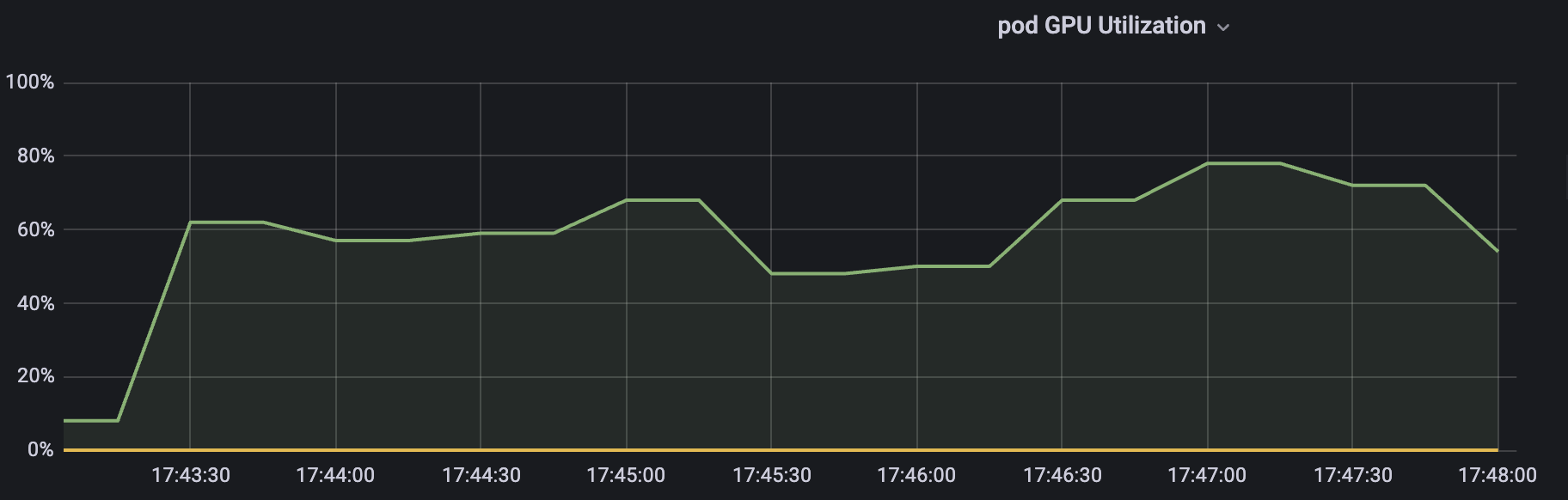
Similarly fluctuates within a certain range, averaging around the limited 60%.
3. Memory Isolation Test
Just need to specify 20000M memory in Pod Resource
resources:
  requests:
    cpu: "4"
    memory: "8Gi"
    nvidia.com/gpu: "1"
    nvidia.com/gpucores: "60"
    nvidia.com/gpumem: "200000"
Then checking in the Pod shows only 20000M
root@hami-30:/mnt/b66582121706406e9797ffaf64a831b0# nvidia-smi
[HAMI-core Msg(68:139953433691968:libvgpu.c:836)]: Initializing.....
Mon Oct 14 13:14:23 2024
+-----------------------------------------------------------------------------+
| NVIDIA-SMI 525.147.05   Driver Version: 525.147.05   CUDA Version: 12.0     |
|-------------------------------+----------------------+----------------------+
| GPU  Name        Persistence-M| Bus-Id        Disp.A | Volatile Uncorr. ECC |
| Fan  Temp  Perf  Pwr:Usage/Cap|         Memory-Usage | GPU-Util  Compute M. |
|                               |                      |               MIG M. |
|===============================+======================+======================|
|   0  NVIDIA A40          Off  | 00000000:00:07.0 Off |                    0 |
|  0%   30C    P8    29W / 300W |      0MiB / 20000MiB |      0%      Default |
|                               |                      |                  N/A |
+-------------------------------+----------------------+----------------------+

+-----------------------------------------------------------------------------+
| Processes:                                                                  |
|  GPU   GI   CI        PID   Type   Process name                  GPU Memory |
|        ID   ID                                                   Usage      |
|=============================================================================|
|  No running processes found                                                 |
+-----------------------------------------------------------------------------+
[HAMI-core Msg(68:139953433691968:multiprocess_memory_limit.c:468)]: Calling exit handler 68
Test script Then run a script to test if it will OOM after requesting 20000M
import torch
import sys

def allocate_memory(memory_size_mb):
    # Convert MB to bytes and calculate number of float32 elements to allocate
    num_elements = memory_size_mb * 1024 * 1024 // 4  # 1 float32 = 4 bytes
    try:
        # Try to allocate GPU memory
        print(f"Attempting to allocate {memory_size_mb} MB on GPU...")
        x = torch.empty(num_elements, dtype=torch.float32, device='cuda')
        print(f"Successfully allocated {memory_size_mb} MB on GPU.")
    except RuntimeError as e:
        print(f"Failed to allocate {memory_size_mb} MB on GPU: OOM.")
        print(e)

if __name__ == "__main__":
    # Get parameter from command line, use default 1024MB if not provided
    memory_size_mb = int(sys.argv[1]) if len(sys.argv) > 1 else 1024
    allocate_memory(memory_size_mb)
Start:
root@hami-30:/mnt/b66582121706406e9797ffaf64a831b0/lixd/hami-test# python test_oom.py 20000
[HAMI-core Msg(1046:140457967137280:libvgpu.c:836)]: Initializing.....
Attempting to allocate 20000 MB on GPU...
[HAMI-core Warn(1046:140457967137280:utils.c:183)]: get default cuda from (null)
[HAMI-core Msg(1046:140457967137280:libvgpu.c:855)]: Initialized
[HAMI-core ERROR (pid:1046 thread=140457967137280 allocator.c:49)]: Device 0 OOM 21244149760 / 20971520000
Failed to allocate 20000 MB on GPU: OOM.
[Additional error messages omitted...]
Directly OOM, seems a bit extreme, let’s try 19500
root@hami-30:/mnt/b66582121706406e9797ffaf64a831b0/lixd/hami-test# python test_oom.py 19500
[HAMI-core Msg(1259:140397947200000:libvgpu.c:836)]: Initializing.....
Attempting to allocate 19500 MB on GPU...
[HAMI-core Warn(1259:140397947200000:utils.c:183)]: get default cuda from (null)
[HAMI-core Msg(1259:140397947200000:libvgpu.c:855)]: Initialized
Successfully allocated 19500 MB on GPU.
[HAMI-core Msg(1259:140397947200000:multiprocess_memory_limit.c:468)]: Calling exit handler 1259
Everything normal, indicating HAMi’s memory isolation is working properly.
4. Summary
Test results are as follows:
- Core isolation
- When gpucores is set to 30%, each task step takes 0.6s, Grafana shows GPU computing power utilization fluctuates around 30%.
- When gpucores is set to 60%, each task step takes 0.3s, Grafana shows GPU computing power utilization fluctuates around 60%.
- Memory isolation
- When gpumem is set to 20000M, attempting to request 20000M results in OOM, requesting 19500M works normally.
We can conclude that HAMi vGPU solution’s core&memory isolation basically meets expectations:
- Core isolation: Pod’s usable computing power fluctuates around the set value, but averages close to the requested gpucores over time
- Memory isolation: When Pod requests GPU memory exceeding the set value, it directly prompts CUDA OOM
WANT TO KNOW MORE?
Connect with our expert team directly via the buttons below